liquidmap guides
liquidmap as a Bookmap alternative for crypto.
Bookmap is the best-known platform for reading the order book. liquidmap does something similar, but only for crypto and inside the browser. This page compares what each one does, using only what can be checked, and says when one or the other may suit you.
Updated
In short
- liquidmap is a crypto-only chart (BTC, ETH, SOL, XRP, BNB, DOGE, ZEC and NEAR) that opens in your browser, on desktop and on mobile. It puts the order book heatmap, the footprint, big bursts and spot and perpetual CVD on one screen.
- Bookmap is a trading platform that, according to its website, lets you see market liquidity and the order book. It covers futures, stocks and crypto, and lets you trade from the chart.
- If you only look at crypto and want everything in the browser, liquidmap is an alternative built for that. If you trade CME futures or stocks, or want to place orders from the platform, Bookmap does things liquidmap does not.
Side by side
| liquidmap | Bookmap (per its website) | |
|---|---|---|
| What it is | A crypto chart with the order book, footprint, bursts and CVD, in the browser. | A trading platform to see market liquidity and the order book. |
| Markets | Crypto only: BTC, ETH, SOL, XRP, BNB, DOGE, ZEC and NEAR. | Futures, stocks and crypto. |
| Order book heatmap | Yes. From Binance or from up to 15 order books from 10 exchanges at once, with walls marked. | Yes: the heatmap shows the historical limit order book. It offers Multibook (consolidated order book). |
| Footprint | Included: what was bought and sold at each price in each candle, with volume profiles, POC, VWAP and imbalances. | Footprint is listed among its add-ons on its pricing page. |
| CVD | Included, spot and perpetual futures in the same panel, with open interest, funding and liquidations. | CVD and a Liquidation Indicator are listed among its add-ons. |
| Bursts and absorption | One bubble for each large market order, with its size: you see whether the price broke through or the burst was absorbed. | An Absorption Indicator and Large Trades Alert are listed among its add-ons. |
| Crypto data | Included in the price. | Its pricing page lists it as free (“Crypto (Free)”), with Binance, Bitfinex and 20+ connections. |
| Where you use it | In your browser, on desktop and mobile, nothing to install. | — |
| Trading from the chart | No. It does not connect to your exchange account and cannot place orders. | Yes: its pricing page includes trading from the chart and the DOM. |
| Price | Founder Pass: €79 for 12 months, one payment, no renewal (until November 22, 30 spots). After that, or without the Pass: €1 for 3 days and €10/month.€1 for 3 days, then €10/month, VAT included, cancel anytime. | There is a free plan (Digital) and paid plans from $49 to $199/month billed monthly; billed yearly it is cheaper and there are lifetime licenses. Futures and stock data are paid separately. |
Bookmap information comes from its public website on November 16, 2026 (sources at the end). Websites change: check theirs before you decide.
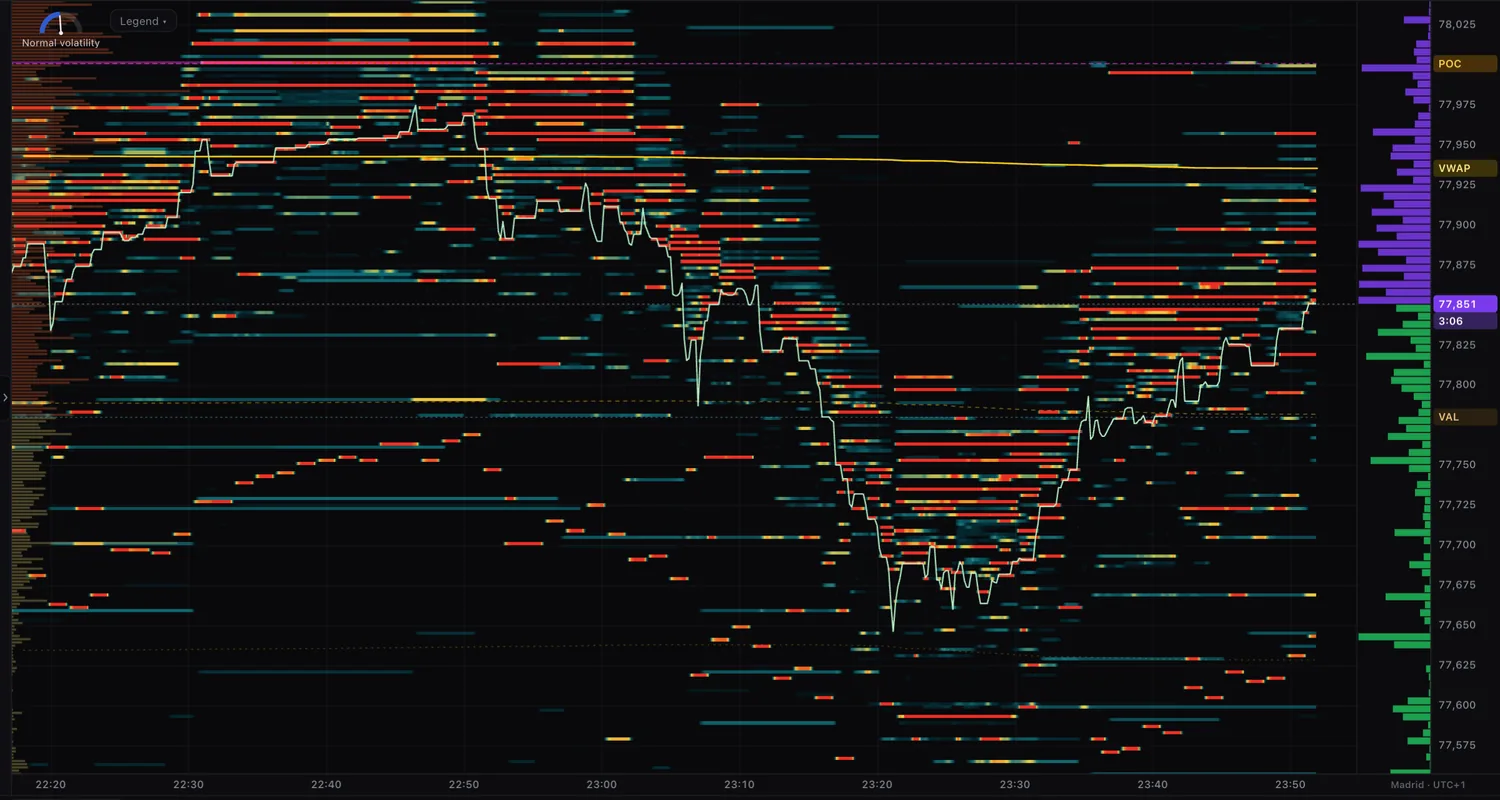
What you see in liquidmap
These are the four things the terminal shows, as they are:
- Where the money is waiting. The order book heatmap, minute by minute, from Binance or from up to 15 order books from 10 exchanges at once.
- Who is entering hard. Bursts: one bubble for each large market order, with its size in BTC, buy or sell, and whether the price broke through or was absorbed.
- What happened inside the candle. The footprint: how much was bought and sold at each price, with volume profiles, POC, VWAP and imbalances.
- Who is really pushing. Spot and perpetual CVD, open interest, funding and liquidations.
And nothing else: it gives no buy or sell signals, promises no profits and never touches your money.
When to pick each one
liquidmap may suit you if
- You only trade or follow crypto.
- You want to open it in the browser, mobile included, with nothing to install.
- You want spot CVD and perpetual CVD side by side.
- You prefer one price with the data included.
Bookmap may suit you if
- You trade CME futures or stocks as well as crypto.
- You want to trade from the platform itself.
- You need the tools and add-ons it lists on its pricing page.
Frequently asked questions
Does liquidmap replace Bookmap?
It depends on what you do. For reading the order book, footprint and CVD of crypto in the browser, it does a similar job. But it does not cover CME futures or stocks and it does not let you trade from the chart, which Bookmap offers according to its website.
Do I have to install anything?
No. liquidmap opens in the browser, on desktop or mobile. It uses public market data: you do not connect your exchange account or hand over API keys.
Can liquidmap place orders on my exchange?
No. It does not connect to your account and cannot trade or touch your funds. It only shows what is happening in the market.
How much does liquidmap cost?
You try everything for €1 for 3 days, then it is €10 a month, VAT included, and you cancel anytime. Until Sunday, November 22 there is also a Founder Pass: 12 months for €79, one payment, no renewal, limited to 30 spots.
Sources and date
Bookmap information was read on its public website on November 16, 2026: bookmap.com/en/crypto and bookmap.com/pricing. Prices and features may have changed since: check them on their site. Anything about Bookmap that could not be verified is not here.
Bookmap is a trademark of Bookmap Ltd. liquidmap has no relationship with Bookmap. The liquidmap features are what the product does today. Nothing on this page is investment advice.